
Wispr Flow alternative for Mac
Keep the dictation.
Lose the monthly bill.
Already use voice typing? QuietSpeech gives you hold-to-talk dictation in your Mac apps for $29 once. See your words as you speak, then release to insert the finished text. On-device by default.
Black Friday: $29 USD once for two Macs. Planned price after this offer: $59 USD.
Apple silicon · macOS 26+ · Two Macs · 14-day refund
No free trial. Any applicable tax is shown at checkout.
The practical differences
Choose how you pay.
Choose where speech is processed.
QuietSpeech is for Mac users who want a one-time purchase and local processing by default. Wispr Flow offers a free tier, more platforms and team features. The right choice depends on where you write and which features you need.
On a small screen, swipe to see both columns.
| What matters | QuietSpeech | Wispr Flow |
|---|---|---|
| Purchase | $29 once for two Macs. No recurring subscription. | Free tier. Pro is $15/user/month on monthly billing or $12/user/month billed annually. |
| Where speech is transcribed | On your Mac by default, using Apple’s recognizer. | In the cloud. Internet access is required for transcription. |
| Words visible while speaking | Live transcript in an overlay; release to insert the finished text. | Desktop dictation inserts completed text after you stop. |
| Cleanup | Apple Intelligence on-device when available; rules-based cleanup otherwise. | Automatic cleanup, including filler words and spoken self-corrections. |
| Setup | License key, Microphone and Accessibility permissions. No account or API key for the default setup. | Account sign-in and platform-specific permissions. |
| Devices | Apple silicon Macs running macOS 26 or later. | Mac, Windows, iPhone and Android. Features vary by platform. |
Documentation comparison, not an accuracy or speed benchmark. Wispr’s plans and features can change. Sources: Wispr pricing, dictation documentation and privacy explanation. The preview row covers desktop dictation, not meeting transcripts.
A good fit for QuietSpeech
Your Mac.
Your words.
You want everyday messages, notes and drafts without a recurring payment. You prefer audio transcription and text cleanup to run on your Mac by default, and you have a compatible Mac.
Apple Intelligence handles local AI cleanup, spoken edits and generation when available. Optional providers are available; choosing one changes where the selected content is processed.
When to keep Wispr Flow
More devices.
More team needs.
Keep Wispr on your shortlist if you dictate across Windows and mobile devices, need shared team administration, or find its free allowance sufficient.
QuietSpeech is a Mac dictation app. It does not replace Wispr’s meeting-notetaking or enterprise administration features.
Try your actual workflow
Make the switch in a familiar app.
Check your Mac
You need Apple silicon and macOS 26 or later. Turn on Apple Intelligence for local AI editing and cleanup.
Set up QuietSpeech
Buy a license, download the app, activate it and grant Microphone and Accessibility permissions. If both apps use Fn, give one a different shortcut.
Use your everyday words
Dictate into Notes or a message. Add important names to the vocabulary, review the inserted text, and select a passage to try a spoken edit.
There is no free trial. Your purchase has a 14-day refund window so you can evaluate it in the apps you actually use.
The product in one screen
Dictate. Edit.
Keep writing.
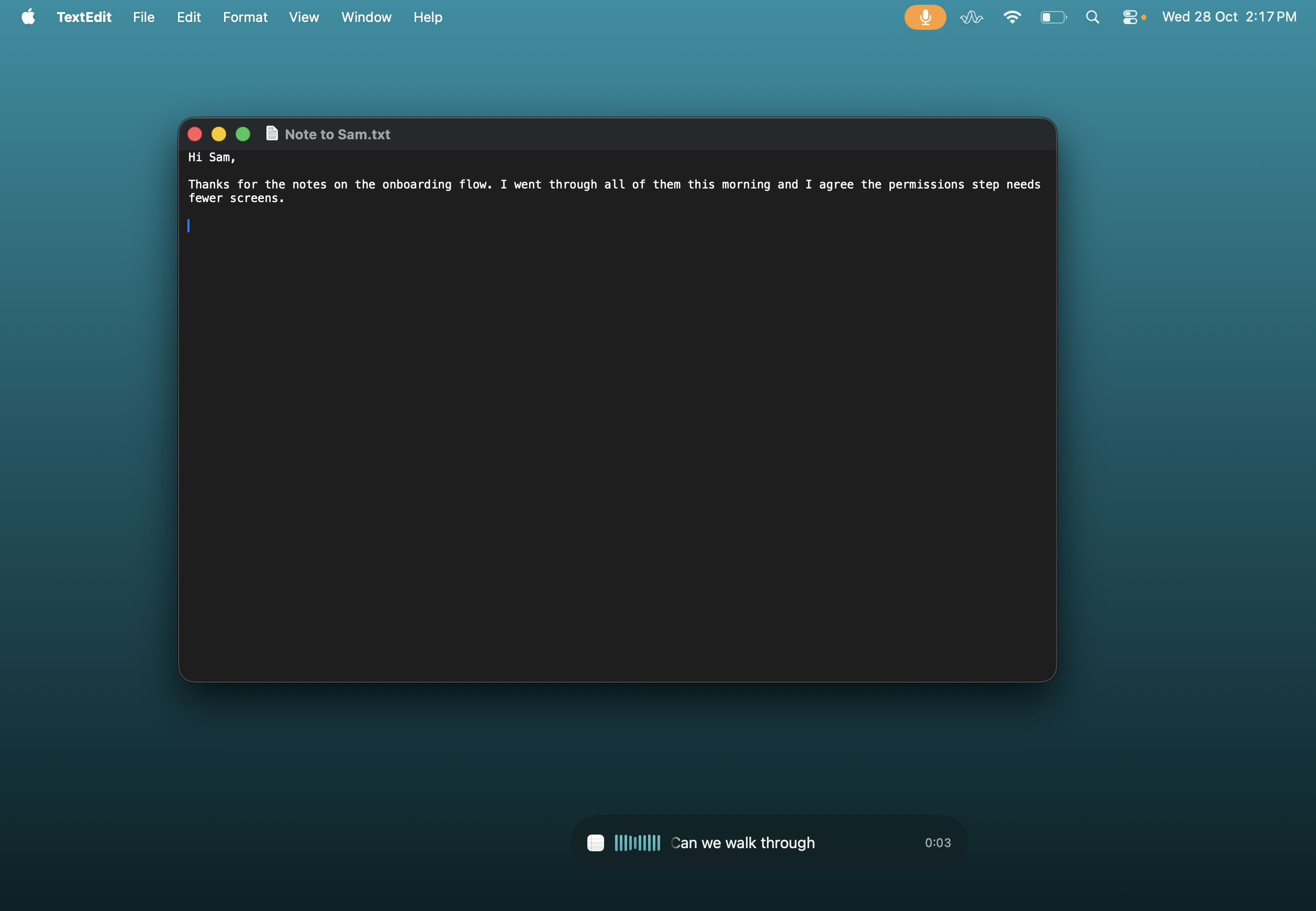
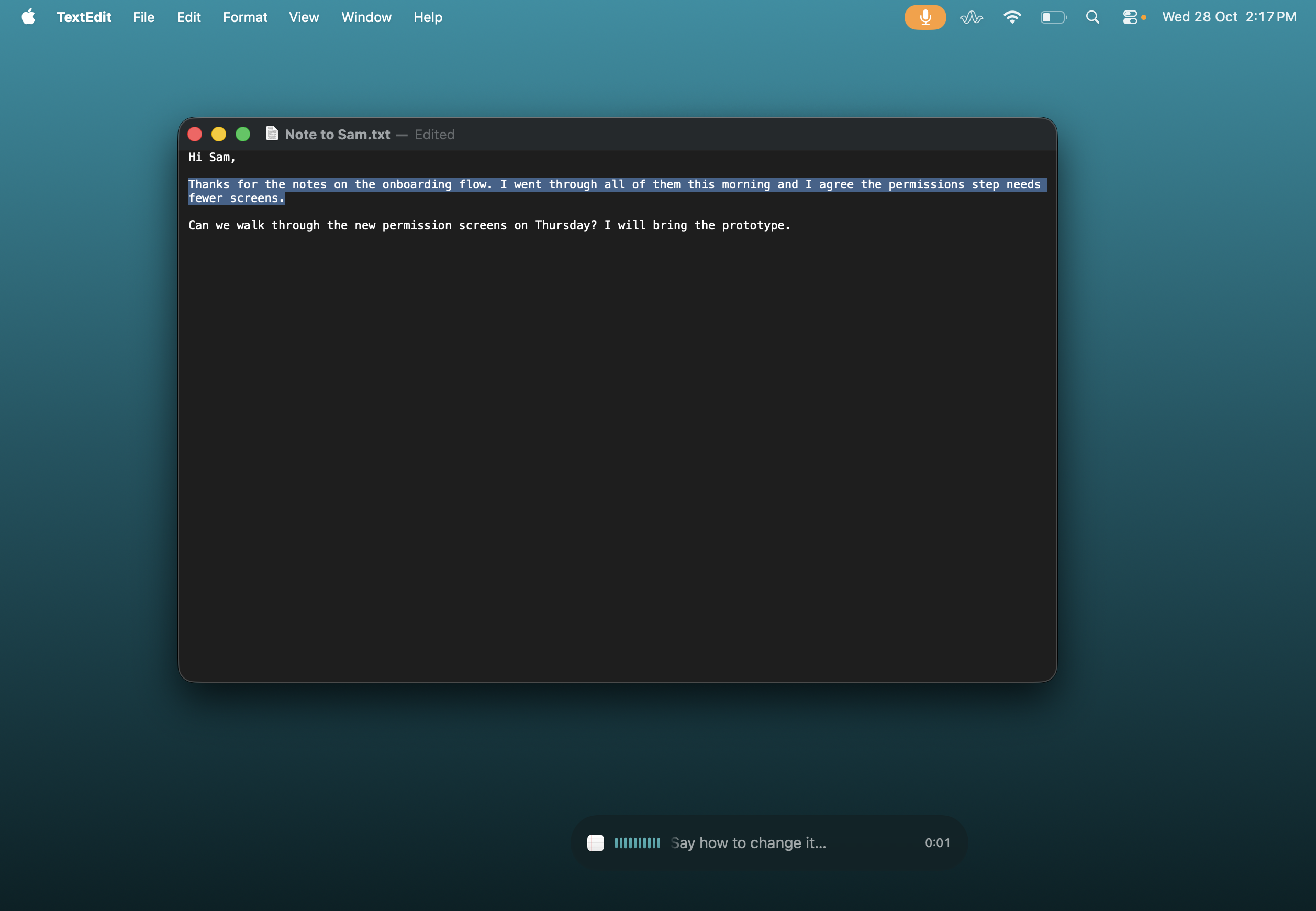
This screenshot shows dictation and spoken editing in a familiar Mac app. Local AI editing and generation need Apple Intelligence.
Before you switch
A few useful answers.
Does QuietSpeech need an API key?
No API key is needed for the default setup: Apple’s recognizer transcribes speech and Apple Intelligence handles local AI text work when available. External providers are optional.
Can I use QuietSpeech offline?
Yes, by default, once the required Apple speech assets are installed. Initial setup may need downloads. The license needs an internet check at least once every 14 days. External cloud providers require a connection.
Does it work without Apple Intelligence?
Basic dictation works with rules-based cleanup. Local AI polishing, selected-text editing and generation need Apple Intelligence. You can also configure another AI provider.
Is it more accurate than Wispr Flow?
We have not published a controlled comparison. QuietSpeech uses Apple’s recognizer by default. Review the product demonstration and evaluate your own names, accent and apps within the 14-day refund window.
One shortcut.
One payment.
Black Friday: $29 USD once for two Macs.
Planned price after this offer: $59 USD.
Apple silicon · macOS 26 or later.
Not right for you? Request a refund within 14 days.
No subscription or account.