
Hold. Speak. Release.
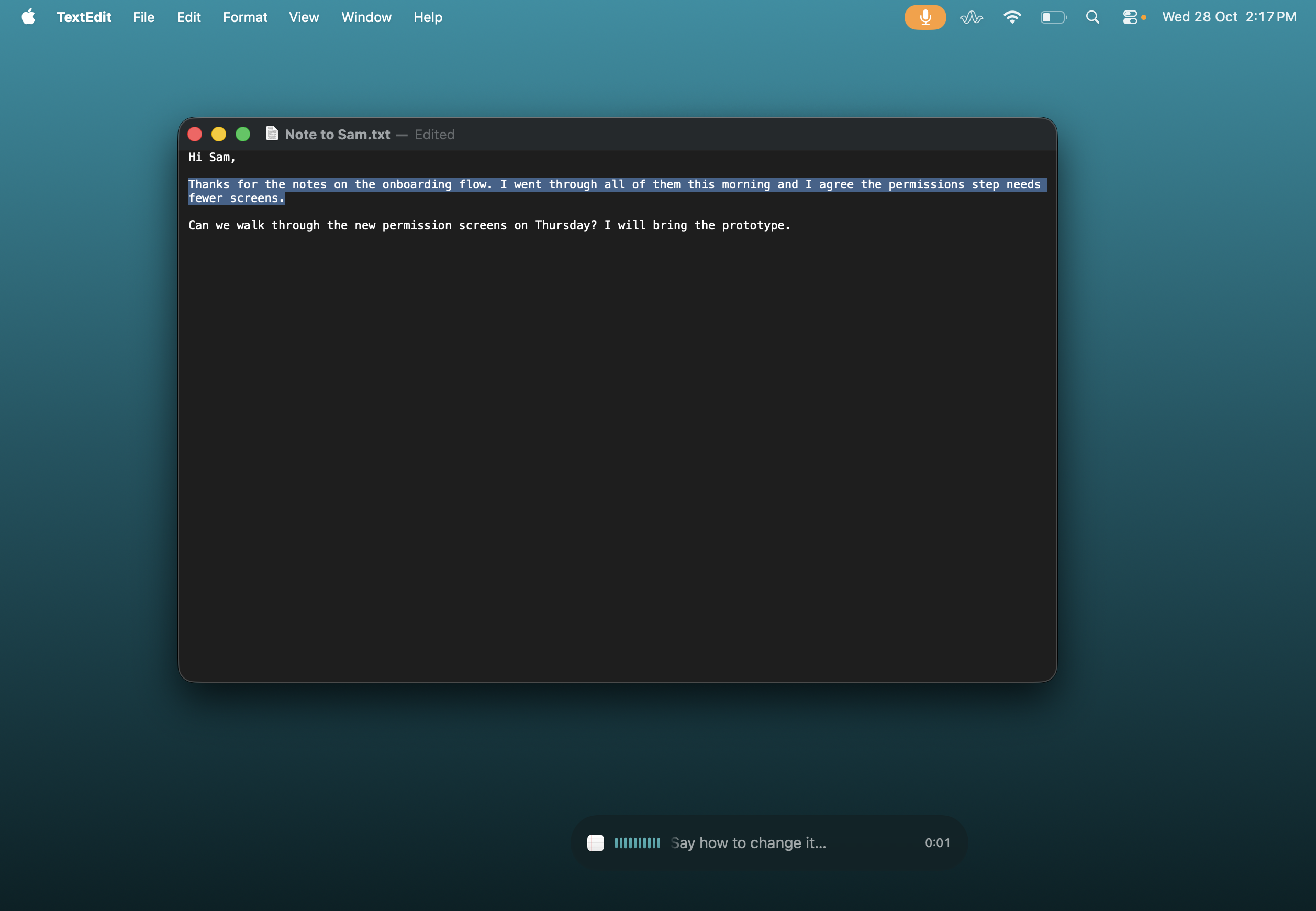
Use Fn or your chosen shortcut. Follow the transcript in QuietSpeech’s overlay, then insert the finished text when you let go.
Apple Dictation alternative
QuietSpeech builds a dictation workflow around Apple’s on-device speech recognition: hold a shortcut, follow the live words, and release to insert. Add your vocabulary and edit selected text by voice. $29 once for two Macs.
Black Friday: $29 USD once for two Macs. Planned price after this offer: $59 USD.
Apple silicon · macOS 26+ · Two Macs · 14-day refund
No free trial. Any applicable tax is shown at checkout.
What you are paying for
Apple Dictation is already included with your Mac. QuietSpeech uses Apple’s recognizer by default, too. The reason to buy is the shortcut, vocabulary, cleanup and editing workflow—not a promise of a more accurate speech engine.
On a small screen, swipe to see both columns.
| What matters | QuietSpeech | Apple Dictation |
|---|---|---|
| Price | $29 once for two Macs. 14-day refund. | Included with macOS. No separate purchase. |
| Speech recognition | Apple’s on-device recognizer by default. | Built into macOS. Availability varies by language and region. |
| Start and stop | Hold Fn, speak, release to insert. Custom and toggle shortcuts are available. | Start with the Microphone key, a configured shortcut or Edit → Start Dictation; press again or Escape to stop. |
| As you speak | Follow the live transcript in an overlay. Finished text is inserted after release. | Dictation enters text in your document; on Apple silicon you can type while dictating. |
| Text workflow | Vocabulary, word replacements and spoken edits over selected text. AI edits need an available provider. | Dictation supports punctuation and simple formatting commands. Apple’s Writing Tools are a separate feature. |
| Compatibility | Apple silicon and macOS 26 or later. | Built into supported macOS versions; features depend on the Mac, language and region. |
This compares standard Keyboard Dictation on macOS 26 with QuietSpeech. Voice Control and Apple Intelligence Writing Tools are separate Apple features. Sources: Apple’s macOS 26 Dictation guide and QuietSpeech’s source and README. No comparative accuracy or speed claim is made.
Three reasons to consider it
Use Fn or your chosen shortcut. Follow the transcript in QuietSpeech’s overlay, then insert the finished text when you let go.
Add names and specialist vocabulary. Set replacements for recurring terms instead of fixing the same spelling every time.
Select text and say “make it shorter.” QuietSpeech rewrites the selection in place using Apple Intelligence or your configured AI provider.
First, check the built-in option
Open System Settings → Keyboard → Dictation. Enable it, choose your language and shortcut, then dictate a message in an app you use. If that meets your needs, keep using it.
QuietSpeech is worth considering if you want its hold-to-talk workflow, live overlay, replacements or spoken editing. It will not necessarily fix recognition errors you already encounter with Apple’s engine.
QuietSpeech needs Apple silicon and macOS 26+. After purchase, download the app, activate your license and grant Microphone and Accessibility permissions. Give built-in Dictation a different shortcut if both respond to Fn.
Stay with Apple Dictation if
You mainly need straightforward voice typing, prefer text to appear directly in your document as you speak, or do not want to buy another app.
It is also the relevant option to check if your Mac does not meet QuietSpeech’s Apple silicon and macOS 26 requirements.
Choose QuietSpeech if
You prefer a dedicated dictation overlay, reusable vocabulary and replacements, plus spoken edits over selected text. You want a one-time purchase for two compatible Macs.
Local AI cleanup, editing and generation need Apple Intelligence. Basic dictation remains available with rules-based cleanup when it is off.
Before you buy
The released default uses Apple’s on-device recognizer. QuietSpeech adds its own shortcut, overlay, cleanup, vocabulary and editing workflow around transcription. It also offers optional external providers.
Not necessarily. Because the default recognizer is Apple’s, the same accent, language or microphone issues may remain. Before buying, check Apple’s troubleshooting guidance and your microphone and language settings.
By default, yes. Apple’s recognizer transcribes locally and Apple Intelligence handles local AI text work when available. Required speech assets may download during setup. Optional providers receive the selected audio or text when you choose to use them.
QuietSpeech is designed for dictation and text work. If you need to navigate or operate your Mac by voice, look at Apple’s Voice Control. Insertion behavior in QuietSpeech can vary by app and text field.
There is no free trial. QuietSpeech costs $29 USD once for two Macs and has a 14-day refund policy. The license needs an internet check at least once every 14 days; the default dictation path can otherwise work offline after setup.
Black Friday: $29 USD once for two Macs.
Planned price after this offer: $59 USD.
Apple silicon · macOS 26 or later.
Not right for you? Request a refund within 14 days.
No subscription or account.